Watch the full demo — connecting Business Central to Microsoft Fabric and Power BI, end to end.
Can Power BI connect to Business Central?
Yes. There are three practical routes, and the right one depends on how much history and control you need:
1. Business Central Power BI apps and connector
Business Central ships Power BI apps and a built-in connector. Fastest to stand up, and fine for standard reports. The limits show up quickly: fixed report shapes, limited history, and no ability to blend Business Central with data from other systems.
2. Microsoft's native Business Central to Fabric integration
Microsoft now lands Business Central data directly into OneLake as delta tables, with very little engineering. A good fit when you want the standard entities in standard shapes and are happy with the structure Microsoft provides.
3. A custom API pipeline into a Fabric warehouse (what we built)
For this client we built a Business Central Power BI integration as a real warehouse: REST API extraction into Bronze, Silver and Gold layers we control. That matters when you need specific entity selection, custom transformation logic, full history, and a semantic model deliberately shaped for both dashboards and AI data agents. All three routes end at a semantic model — choose based on how much control you need over the middle.
How we build it: the secure Microsoft Fabric pipeline
- Microsoft Entra ID — an app registration gives Fabric an application identity, so the pipeline authenticates machine-to-machine with no user password involved.
- Azure Key Vault — tenant ID, client ID, client secret, company ID and environment name live here as secrets, read at runtime. Nothing sensitive in notebooks or source control.
- Fabric notebook — pulls the secrets, generates the OAuth token, calls the Business Central REST APIs and loads the results, unattended on a schedule.
- Bronze / Silver / Gold — raw entities land untouched in OneLake (Bronze), PySpark cleans and standardises them (Silver), and a star schema of dimensions and facts is built for reporting (Gold).
- Power BI — connects to the Gold model, with scheduled refresh so dashboards stay current.
How to connect Business Central to Microsoft Fabric (step by step)
- Get your company ID — call the Companies API; every subsequent request runs against a specific company.
- Register an app in Microsoft Entra ID and note the client ID and tenant ID.
- Create a client secret — shown only once, so put it straight into Key Vault.
- Add API permissions and grant admin consent — for this build,
Financials.ReadWrite.AllandAutomation.ReadWrite.All. - Register the same client ID inside Business Central under Microsoft Entra Applications, with a permission set such as D365 Automation. Skip this and every call returns 401.
- Store every credential in Key Vault so secrets can rotate without touching code.
- Authenticate with OAuth 2.0 client credentials against the Business Central default scope, and pass the token as a bearer header.
- Extract entities to Bronze — customers, vendors, items, sales and purchase invoices, orders, accounts, GL entries, bank accounts.
- Clean into Silver — drop
@odata.*metadata columns, validate nulls, blanks, duplicates and types, standardise names. - Model Gold as a star schema — dimensions for customer, vendor, item, account, bank account and date; facts for sales and purchase invoices, orders and general ledger.
- Build the semantic model and dashboards, then schedule refresh.
What a Business Central Power BI dashboard shows
Three dashboards were delivered on the Gold model, covering the questions leadership asks weekly:
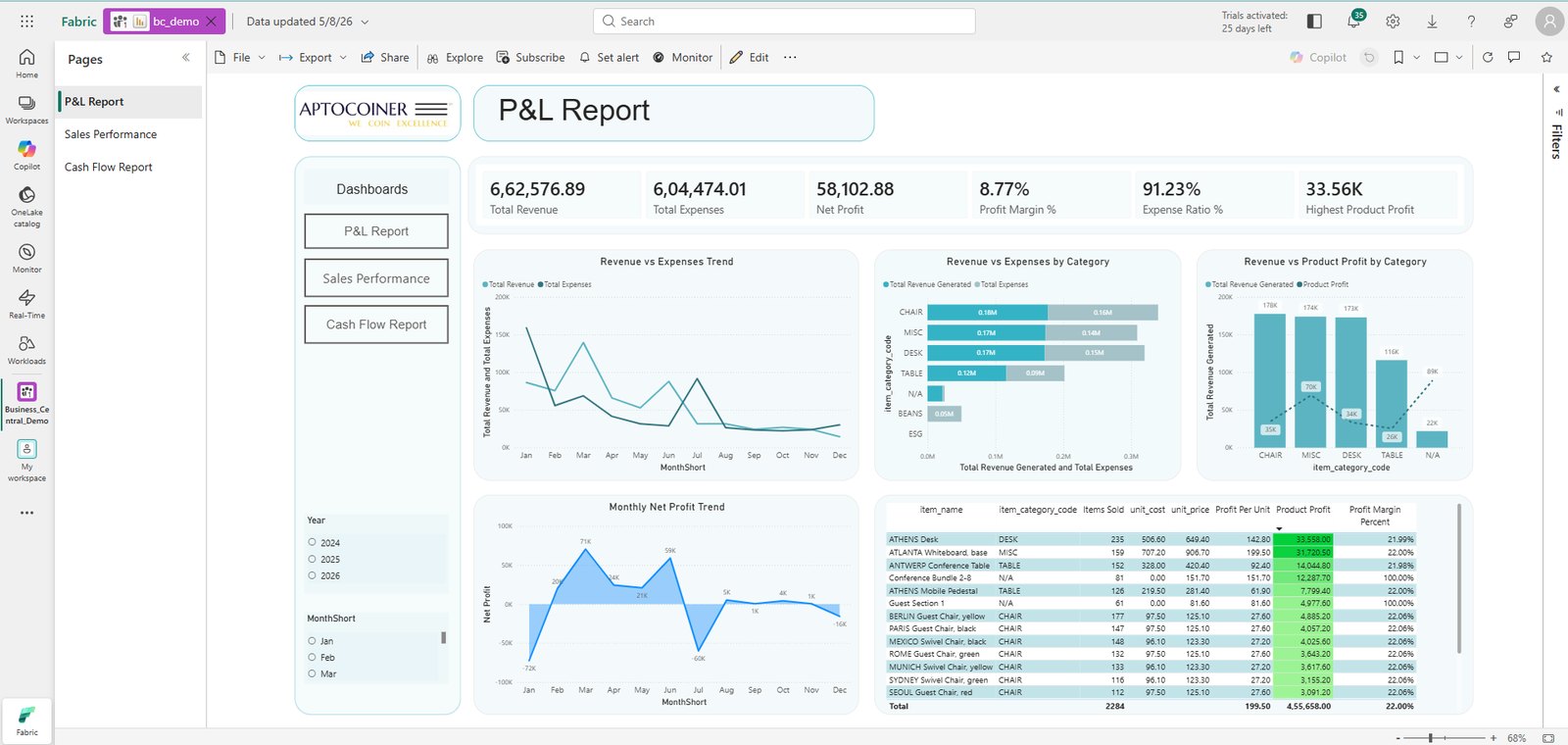
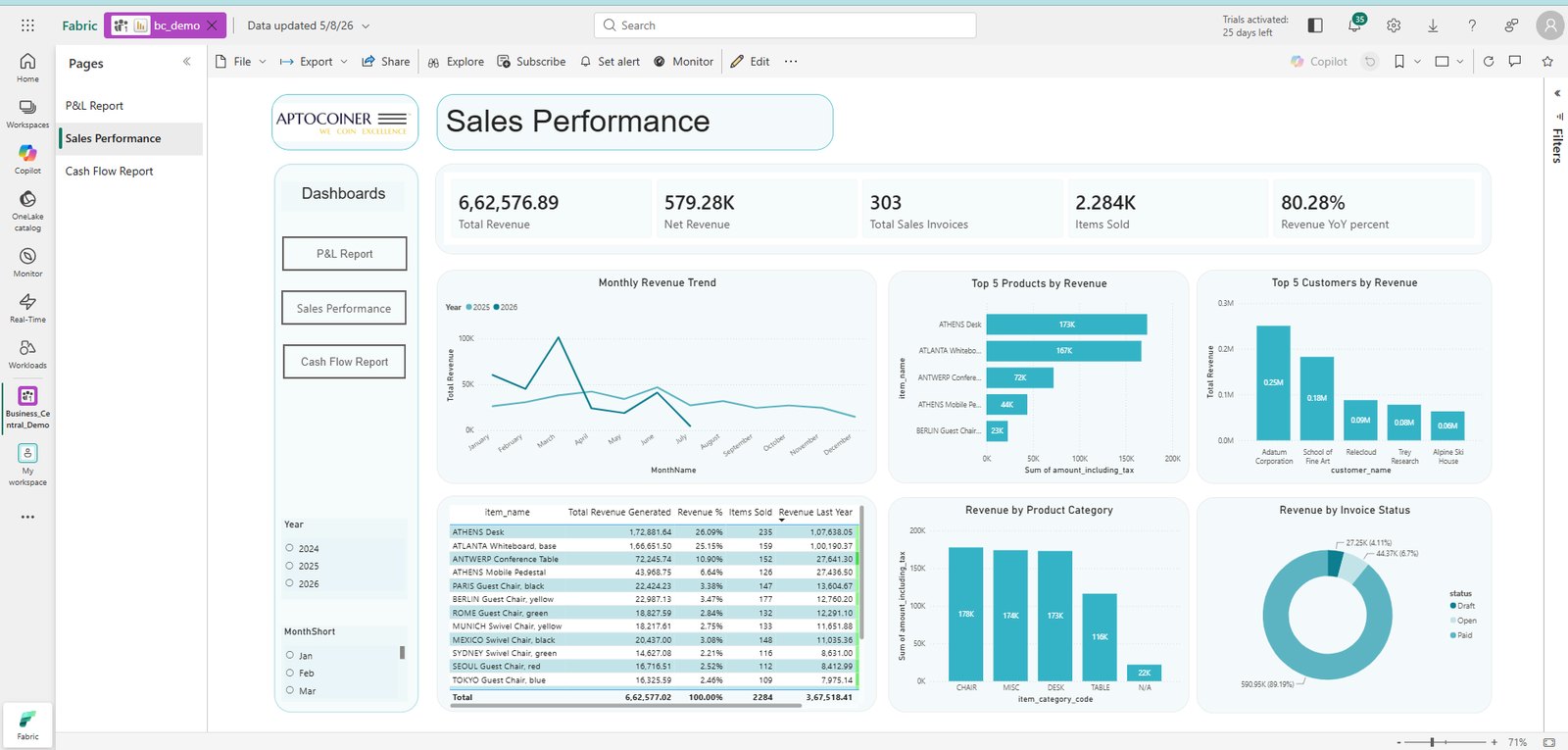
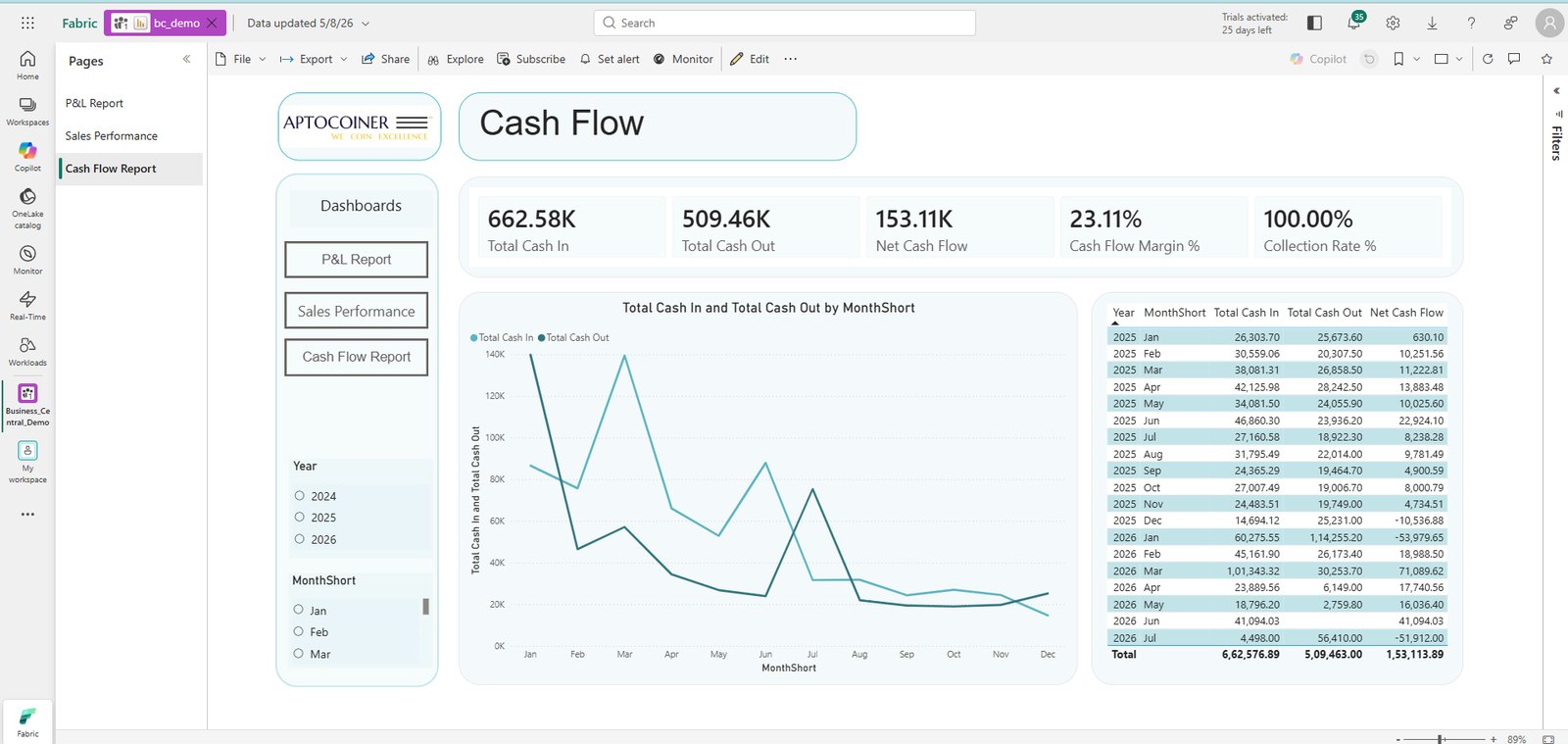
One governed model, one definition
Because the model is governed rather than exported, every number means the same thing in every report — and the same definitions carry through to anything AI asks of it. The end-to-end demo above shows these dashboards being built on that model.
Making Business Central analytics ready for AI data agents
The warehouse is the prerequisite; making it agent-ready is metadata work on top: business-friendly naming, descriptions that explain how each measure should be interpreted, schema simplification, verified answers for the questions asked weekly, and explicit AI instructions carrying your business rules. Table selection on the agent is your governance boundary, since columns cannot be excluded individually.
Once published, a manager can ask “which item generated the highest revenue profit?” in Microsoft 365 Copilot and get an answer in seconds instead of an hour in Excel.
Related reading
The agent-side method is covered on the AI data agents page. For the platform distinction see Fabric Copilot vs Data Agent; for the category basics, what a data agent is and how it works; and for billing and sizing, what Fabric data agents cost.
Common errors when connecting Business Central to Fabric
- 401 after granting consent — the app was registered in Entra ID but not inside Business Central. Add the client ID under Microsoft Entra Applications with a permission set.
- Credentials in notebooks — a secret in code is a secret in source control. Read from Key Vault at runtime.
- Skipping Bronze — transforming during ingestion destroys your ability to replay or audit.
- OData metadata columns — strip the
@odata.*fields in Silver or they pollute the model. - Reporting straight off Silver — without a Gold star schema, dashboards are slow and inconsistent, and an agent cannot reason about the business.
- Cross-tenant surprises — if Business Central, Fabric and Key Vault sit in different tenants, confirm the topology before build, not during.
Download the technical documentation
The full implementation write-up we hand to client data teams — architecture, prerequisites, the twelve build steps, the dashboard specifications and the pitfalls above, in one PDF.
Connect Business Central to Microsoft Fabric — technical guide
- Prerequisites: capacity, Entra rights, Azure subscription
- Entra ID app registration, client secret and exact API permissions
- The Business Central-side registration most teams miss
- Key Vault secret layout and the OAuth client-credentials flow
- Bronze / Silver / Gold build steps with the checks we run per table
- The star schema, and dashboard specifications for P&L, Sales and Cash Flow
Frequently asked questions
Can Power BI connect to Business Central?
Yes — via the Business Central Power BI apps and connector, Microsoft's native Fabric integration into OneLake, or a custom REST API pipeline into a Fabric warehouse. Control over history and transformation is what separates them.
How do I export Business Central data to Power BI?
Register an Entra ID application, add Business Central API permissions and grant admin consent, register the same client ID inside Business Central with a permission set, store credentials in Key Vault, then call the REST APIs from a Fabric notebook and model the data before connecting Power BI.
Is Business Central financial reporting enough on its own?
For statutory and standard statements, often yes. It stops being enough when you need history for trends, cross-module analysis across sales, purchasing and inventory, or metrics that combine Business Central with systems outside the ERP.
Why do my API calls return 401 after granting consent?
Entra ID registration alone is not enough. The same client ID must be registered inside Business Central under Microsoft Entra Applications with a permission set such as D365 Automation. This is the most common cause of authentication failures.
Does a Business Central pipeline need paid Fabric capacity?
Yes if a data agent is in scope — trial capacity cannot run one. For ingestion and warehousing, size against entity volume and refresh frequency rather than user count. Billing and sizing detail: what Fabric data agents cost.
How long does an implementation take?
Scope is the variable, not technology. Core finance and sales entities through to three dashboards is a matter of weeks. Entra ID and cross-tenant approvals inside the client organisation are usually the longest lead time — start them first.
Want this built for you?
Aptocoiner Analytics builds the full Business Central → Microsoft Fabric → Power BI pipeline, then layers AI data agents on top — secure, automated and cost-optimised.
The same pipeline, other source systems
Xero → Microsoft Fabric & Power BI
OAuth 2.0 with refresh-token rotation, Key Vault, and live finance dashboards on Fabric.
QuickBooks → Microsoft Fabric & Power BI
Automated QuickBooks extraction into OneLake, modelled for real-time financial reporting.
Aptocoiner Analytics provides Microsoft Fabric Consulting, Power BI Consulting, Data Strategy Consulting, Data Warehouse Consulting and Business Intelligence Services.