Can you connect SAP Concur to Power BI or Microsoft Fabric natively?
No. SAP Concur has no first-party connector for Power BI or Microsoft Fabric, and Microsoft's SAP connectors in Fabric target SAP ERP (S/4HANA, BW, HANA, Datasphere), not Concur. There are three routes: a third-party connector, Concur's file extracts over SFTP, or calling the SAP Concur REST API directly.
| Route | How it works | Good for | Watch out for |
|---|---|---|---|
| Third-party connector | CData, Fivetran, Peliqan and similar sync Concur into Power BI or a warehouse | Fast start, no code | Per-connector licence; you get the vendor's table shapes and API version (e.g. Fivetran's Concur connector doesn't expose v4 exception detail); limited control over the model |
| Extract files (SFTP) | Concur produces scheduled flat-file extracts; a pipeline picks them up | Finance-standard accounting extracts | Batch latency, fixed file layouts, SFTP setup with Concur |
| SAP Concur REST API (this build) | A Fabric notebook authenticates with OAuth 2.0 and pages through the APIs | Full control, data lands in OneLake next to your ERP/HR data, ready for Power BI and AI data agents | You own pagination, schema drift and token handling |
I chose the API route because the goal was a governed expense model in OneLake. A connector that only feeds a single Power BI report wouldn't give us that. It also has no licence cost, and every column is under our control.
The SAP Concur to Microsoft Fabric architecture
The pipeline has three components: the SAP Concur API as the source, a Microsoft Fabric notebook (Python) for compute and orchestration, and a Fabric Lakehouse storing Delta tables in a Bronze → Silver → Gold medallion layout that Power BI reads through the Lakehouse semantic model.
Every dataset follows the same repeatable four-step pattern in the notebook:
- Authenticate: get an access token from SAP Concur.
- Fetch: call the SAP Concur API and page through every record.
- Format: flatten the nested JSON into a tabular shape.
- Save: write it to the Fabric Lakehouse as a Delta table.
Want the full architecture and every notebook step in one document? The 19-page integration guide has the complete code screenshots for all three layers.
Get the guideStep 1: Configure the SAP Concur application
To call the SAP Concur API you need six values from your Concur company app: the
application name, client ID, client secret, company UUID, company request token and API region
(data centre, e.g. eu2). I built and tested everything against a Concur sandbox first.
Keep the client secret and request token out of the notebook. In production, store them in
Azure Key Vault and read them at runtime, the same pattern as our
Business Central to Fabric build.
The API region matters: every endpoint, including the token endpoint, lives on your data-centre host
(https://{data_center}.api.concursolutions.com).
Step 2: Authenticate to the SAP Concur API (OAuth 2.0)
SAP Concur issues an access token through OAuth 2.0. The notebook POSTs the client ID,
client secret, company UUID (as username) and request token (as password) to
/oauth2/v0/token with grant_type=password and credtype=authtoken, then
sends the token as a Bearer header on every call.
Python · authentication and paginated extraction (Fabric notebook)
# 1. AUTHENTICATE
token_url = f"https://{data_center}.api.concursolutions.com/oauth2/v0/token"
token_payload = {
    "client_id": client_id,
    "client_secret": client_secret,
    "grant_type": "password",
    "username": company_uuid,
    "password": request_token,
    "credtype": "authtoken",
}
token_response = requests.post(token_url, data=token_payload)
access_token = token_response.json().get("access_token")

# 2. FETCH ALL RECORDS (100 per page)
all_users, start_index = [], 1
while True:
    url = (f"https://{data_center}.api.concursolutions.com"
           f"/profile/identity/v4/Users?count=100&startIndex={start_index}")
    headers = {"Authorization": f"Bearer {access_token}", "Accept": "application/json"}
    response = requests.get(url, headers=headers)
    if response.status_code != 200:
        print(f"Error fetching data: {response.text}")
        break
    data = response.json().get("Resources", [])
    if not data:
        break
    all_users.extend(data)
    if len(data) < 100:
        break
    start_index += 100

print(f"Fetched {len(all_users)} records.")
SAP Concur caps responses at 100 records per call, so the while loop asks for
1–100, then 101–200 and so on, advancing startIndex until a page comes back empty or short.
Step 3: Extract SAP Concur data into the Bronze layer
Bronze holds the raw API output as Delta tables. Each response is flattened with
pandas.json_normalize, every column is cast to string, so Spark can't fail on mixed
types, and the result is saved with saveAsTable. Three SAP Concur APIs feed three Bronze tables.
Python / PySpark · flatten JSON and save to the Lakehouse
# 3. FLATTEN NESTED JSON INTO CLEAN COLUMNS
df_flattened = pd.json_normalize(all_users, sep="_")

# Cast everything to string so mixed values (numbers + blanks) can't break Spark
df_clean = df_flattened.astype(str)

# 4. SAVE TO THE FABRIC LAKEHOUSE AS A DELTA TABLE
spark_df = spark.createDataFrame(df_clean)
spark_df.write.mode("overwrite").saveAsTable("Employee_Details")| Bronze table | SAP Concur API endpoint | Rows | Columns | Key attributes |
|---|---|---|---|---|
Employee_Details | GET /profile/identity/v4/Users | 102 | 44 | User ID, name, department, employee number, cost centre, email, status |
Expense_Report_Summaries | GET /api/v3.0/expense/reports?user={user_email} | 133 | 94 | Report ID, name, total, currency, approval & payment status, owner, submit & last-modified dates |
Expense_Report_Items_Direct | GET /api/v3.0/expense/entries?user=ALL | 100 | 116 | Report ID, expense type, vendor, amount, currency, transaction date, description, category |
Identity v4 nests enterprise attributes under SCIM schema keys such as
urn:ietf:params:scim:schemas:extension:enterprise:2.0:User. json_normalize unpacks
them into separate columns (department, cost centre, employee number). That's why Bronze ends up with 44 columns for employees.
Step 4: Cleanse SAP Concur data into the Silver layer
Silver turns raw strings into trustworthy columns. The notebook reads each Bronze table, drops fields that are more than 50% empty, renames API fields to business names, casts amounts, dates and booleans, extracts clean emails with regex, standardises text, fills nulls and runs data quality checks.
| Transformation | What it fixes |
|---|---|
| Type casting | Amounts to Double, dates to Date, text booleans to real True/False |
| Email extraction | Regex pulls clean addresses out of nested JSON strings |
| Text standardisation | trim() + lower() so "Taxi" and "taxi" don't become two categories |
| Null handling | Null amounts → 0.0; missing text → "Unknown" / "Not Assigned" |
| Quality checks | Row counts, records missing email/country, zero-amount lines |
PySpark · Silver cleansing for employee details (simplified excerpt)
from pyspark.sql.functions import col, to_date, regexp_replace, trim, when, lit

spark.sql("DROP TABLE IF EXISTS silver_employee_details")
df_bronze = spark.table("Employee_Details")

ENT = "urn:ietf:params:scim:schemas:extension:enterprise:2.0:User"
df_clean = df_bronze.select(
    col("id").alias("Employee_UUID"),
    col("userName").alias("Login_ID"),
    col("displayName").alias("Employee_Display_Name"),
    col("emails").alias("Email_Address_Raw"),
    col("active").alias("Is_Active_Raw"),
    col(f"`{ENT}_employeeNumber`").alias("Employee_Number_Raw"),
    col(f"`{ENT}_costCenter`").alias("Cost_Center_Raw"),
)

# Text "True"/"False" -> real Boolean for Power BI filtering
df_clean = df_clean.withColumn("Is_Active", when(col("Is_Active_Raw") == "True", True).otherwise(False))

# Blank / "nan" cost centres -> explicit default
df_clean = df_clean.withColumn("Cost_Center",
    when(col("Cost_Center_Raw").isNull() | (trim(col("Cost_Center_Raw")).isin("", "nan")), lit("Not Assigned"))
    .otherwise(trim(col("Cost_Center_Raw"))))

df_clean.write.mode("overwrite").saveAsTable("silver_employee_details")| Silver table | Rows | Columns |
|---|---|---|
silver_employee_details | 102 | 14 |
silver_expense_report | 133 | 27 |
silver_expense_items | 100 | 28 |
Column counts drop from 44/94/116 to 14/27/28. That's the cost of mostly-empty Concur fields that a connector would have carried straight into your model.
Step 5: Model the Gold star schema
Gold is a star schema of three dimensions and one fact:
dim_employee, dim_report and dim_expense_type, each deduplicated with an
integer surrogate key, and fact_expenses, which left-joins every expense line item to those keys.
Power BI then gets clean one-to-many relationships.
- Email fix before dimensions: some Silver emails were still corrupted, so the notebook re-extracts them with regex from the raw Bronze JSON and joins them back. No employee is left without a valid email.
- Standardise and deduplicate:
trim()+lower()on business keys (Login ID, Report ID, Expense Type), thendropDuplicates(), so each employee, report and expense type appears once. - Surrogate keys:
Employee_SK,Report_SKandExpense_Type_SKare generated per dimension row. - Fact build: the same key cleaning is applied to the line items, then left joins attach all three surrogate keys.
PySpark · building fact_expenses (simplified excerpt; full notebook in the guide)
from pyspark.sql.functions import col, trim, lower

items = spark.table("silver_expense_items")
dim_emp = spark.table("dim_employee")
dim_rep = spark.table("dim_report")
dim_typ = spark.table("dim_expense_type")

# Clean join keys exactly as the dimensions were cleaned
items = (items
  .withColumn("k_owner", lower(trim(col("Report_Owner_ID"))))
  .withColumn("k_report", lower(trim(col("Report_ID"))))
  .withColumn("k_type", lower(trim(col("Expense_Type")))))

fact = (items
  .join(dim_emp.select(lower(trim(col("Login_ID"))).alias("k_owner"), "Employee_SK"), "k_owner", "left")
  .join(dim_rep.select(lower(trim(col("Report_ID"))).alias("k_report"), "Report_SK"), "k_report", "left")
  .join(dim_typ.select(lower(trim(col("Expense_Type"))).alias("k_type"), "Expense_Type_SK"), "k_type", "left")
  .select("Employee_SK", "Report_SK", "Expense_Type_SK",           # keys for relationships
          "Report_ID", "Transaction_Date",                            # business key + date
          "Posted_Amount", "Approved_Amount",                         # financials
          "Receipt_Received", "Has_Exceptions"))                      # compliance flags

fact.write.mode("overwrite").saveAsTable("fact_expenses")
Keeping Has_Exceptions and Receipt_Received on the fact is what makes compliance
reporting possible later. Finance can slice non-compliant spend by employee and expense type without going back to Concur.
A note on surrogate keys
The build uses monotonically_increasing_id(), which is unique within a run but not stable across
full reloads. That's fine while every layer is rebuilt with overwrite. If you move to incremental
loads, switch to a hash of the business key (e.g. xxhash64) or a persisted key map, so fact rows
never point at a renumbered dimension.
Step 6: Build the Power BI expense analytics dashboard
Power BI connects to the Fabric Lakehouse semantic model holding the four Gold tables. Relationships run one-to-many through the surrogate keys, and explicit DAX measures use Posted_Amount, so totals are currency-converted.
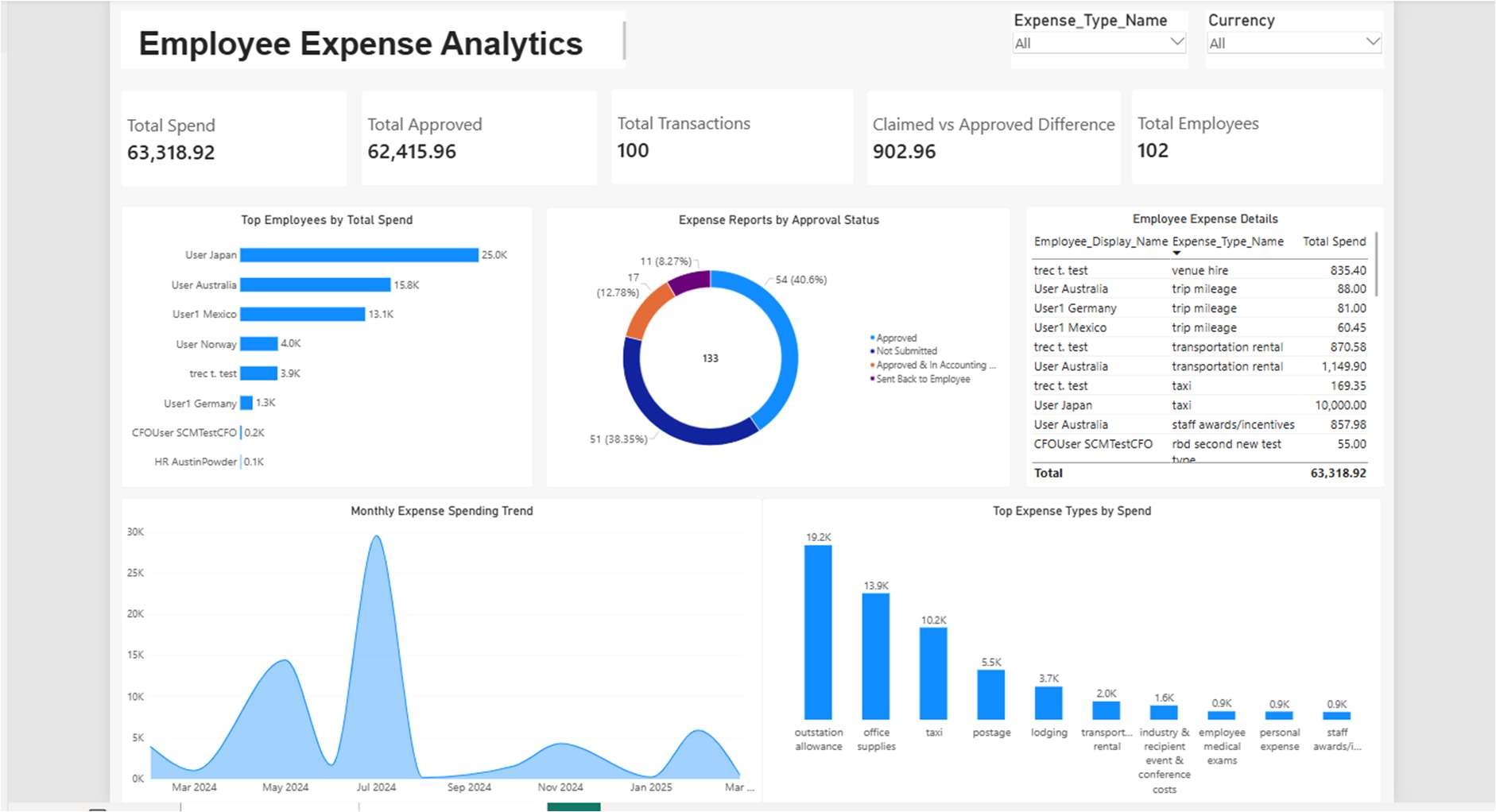
The Employee Expense Analytics report answers spend, approval and trend questions on one page.
- KPI cards: Total Spend (63,318.92), Total Approved (62,415.96), Claimed vs Approved Difference (902.96), Total Transactions (100), Total Employees (102).
- Approval workflow: donut of the 133 expense reports by status: approved, not submitted, in accounting, sent back to employee.
- Spend analysis: top employees by spend, top expense types by spend, and a monthly spending trend.
- Detail: an employee × expense-type table with slicers for expense type and currency.
Total Spend    = SUM ( fact_expenses[Posted_Amount] )
Total Approved = SUM ( fact_expenses[Approved_Amount] )
Claimed vs Approved Difference = [Total Spend] - [Total Approved]
Total Transactions = COUNTROWS ( fact_expenses )
Because the Gold tables are Delta tables in OneLake, the same model can run in Direct Lake mode, with no import refresh. It can also become the governed layer an AI data agent answers from, as described on the AI-ready data warehousing page. For capacity sizing, see Microsoft Fabric pricing.
Common mistakes when integrating SAP Concur with Fabric
- Wrong data-centre host: the token and every API call must use your region
(
us,eu2…). A token from one host won't work on another. - Stopping at page one: without the
startIndexloop you silently get only the first 100 records. - Letting Spark infer Bronze types: mixed numbers and blanks crash
createDataFrame. Land strings, type in Silver. - Joining on raw keys: "Taxi" ≠ "taxi " — trim and lower-case keys on both sides of every join.
- Secrets in the notebook: move the client secret and request token to Key Vault before the notebook is shared or scheduled.
Download the SAP Concur to Microsoft Fabric integration guide
The complete implementation document behind this article: architecture, Concur app configuration, the OAuth flow and every notebook for Bronze, Silver and Gold, with the code screenshots, table outputs and the Power BI build.
SAP Concur to Microsoft Fabric Integration: full technical guide (PDF, 19 pages)
- Solution architecture and SAP Concur application configuration
- OAuth 2.0 authentication and paginated extraction code
- Bronze ingestion for employees, expense reports and line items
- Silver cleansing notebooks, with transformations and data quality checks
- Gold star schema: dimension and fact table code with surrogate keys
- Power BI integration, DAX measures and the expense analytics dashboard
Frequently asked questions
Does SAP Concur have a native connector for Power BI or Microsoft Fabric?
No. SAP Concur doesn't ship a first-party connector for Power BI or Microsoft Fabric. You can buy a third-party connector (CData, Fivetran, Peliqan), use Concur's file-based extracts over SFTP, or call the SAP Concur REST API yourself from a Fabric notebook. This build uses the REST API.
How do you authenticate to the SAP Concur API from Microsoft Fabric?
With OAuth 2.0. The notebook POSTs the client ID, client secret, company UUID and company request token to /oauth2/v0/token on your data centre (for example eu2.api.concursolutions.com), using grant_type=password and credtype=authtoken. The response holds a short-lived access token, which is sent as a Bearer header on every API call.
Which SAP Concur APIs do you need for expense analytics?
Three: Identity v4 Users (/profile/identity/v4/Users) for employees, Expense Reports v3 (/api/v3.0/expense/reports) for report headers and approval status, and Expense Entries v3 (/api/v3.0/expense/entries) for line items. Together they give you the employee, report, expense-type and fact tables of a star schema.
How does SAP Concur API pagination work?
The Identity v4 Users endpoint returns at most 100 records per call. Loop with count=100 and increase startIndex by 100 each time. Stop when a page comes back empty or has fewer than 100 records.
Why convert every SAP Concur column to string in the Bronze layer?
Concur JSON mixes numbers, blanks and nested objects in the same field. If you let Spark infer types, spark.createDataFrame fails on those mixed values. Landing everything as text in Bronze keeps the raw load reliable. Real types (Double, Date, Boolean) are then applied on purpose in the Silver layer.
Can I use Direct Lake with SAP Concur data in Fabric?
Yes. The Gold tables are Delta tables in a Fabric Lakehouse, so a Direct Lake semantic model can read them without an import refresh. At expense-data volumes you stay well within Direct Lake guardrails. Sizing and cost are covered in Microsoft Fabric pricing.
Should I build a custom pipeline or buy a SAP Concur connector?
Buy if you only need standard tables in Power BI quickly. Build if you want the data in OneLake next to your ERP and HR data, control over the model, no per-connector licence, and a semantic model an AI data agent can query. The custom route here took one notebook per layer.
Want SAP Concur in Fabric without building it yourself?
Aptocoiner Analytics builds the full SAP Concur → Microsoft Fabric → Power BI pipeline. It's secured with Key Vault, scheduled, and modelled so your expense data sits alongside ERP and HR data, ready for Power BI and AI data agents.
The same pipeline, other source systems
Business Central → Microsoft Fabric
Entra ID app registration, Key Vault, a Bronze/Silver/Gold warehouse and P&L, sales and cash dashboards.
Xero → Microsoft Fabric & Power BI
OAuth 2.0 with refresh-token rotation and live finance dashboards on Fabric.
QuickBooks → Microsoft Fabric & Power BI
Automated QuickBooks extraction into OneLake for real-time financial reporting.
All API integrations
Every source system we've connected to Microsoft Fabric, in one place.
Aptocoiner Analytics provides Microsoft Fabric Consulting, Power BI Consulting, Data Warehouse Consulting and Business Intelligence Services.